Authentication
Hub Chatt2.me authenticates API requests with the API Key of your Application. Use it for the documented management and messaging operations from backend services, automations, and integrations. Public Calendar booking operations are the explicit exception described below.
API Key
The API Key is tied to an Application. All requests made with it operate within the context of that Application.
How to obtain
- Create a Hub Chatt2.me account, verify the email, and open the dashboard
- Navigate to your Application
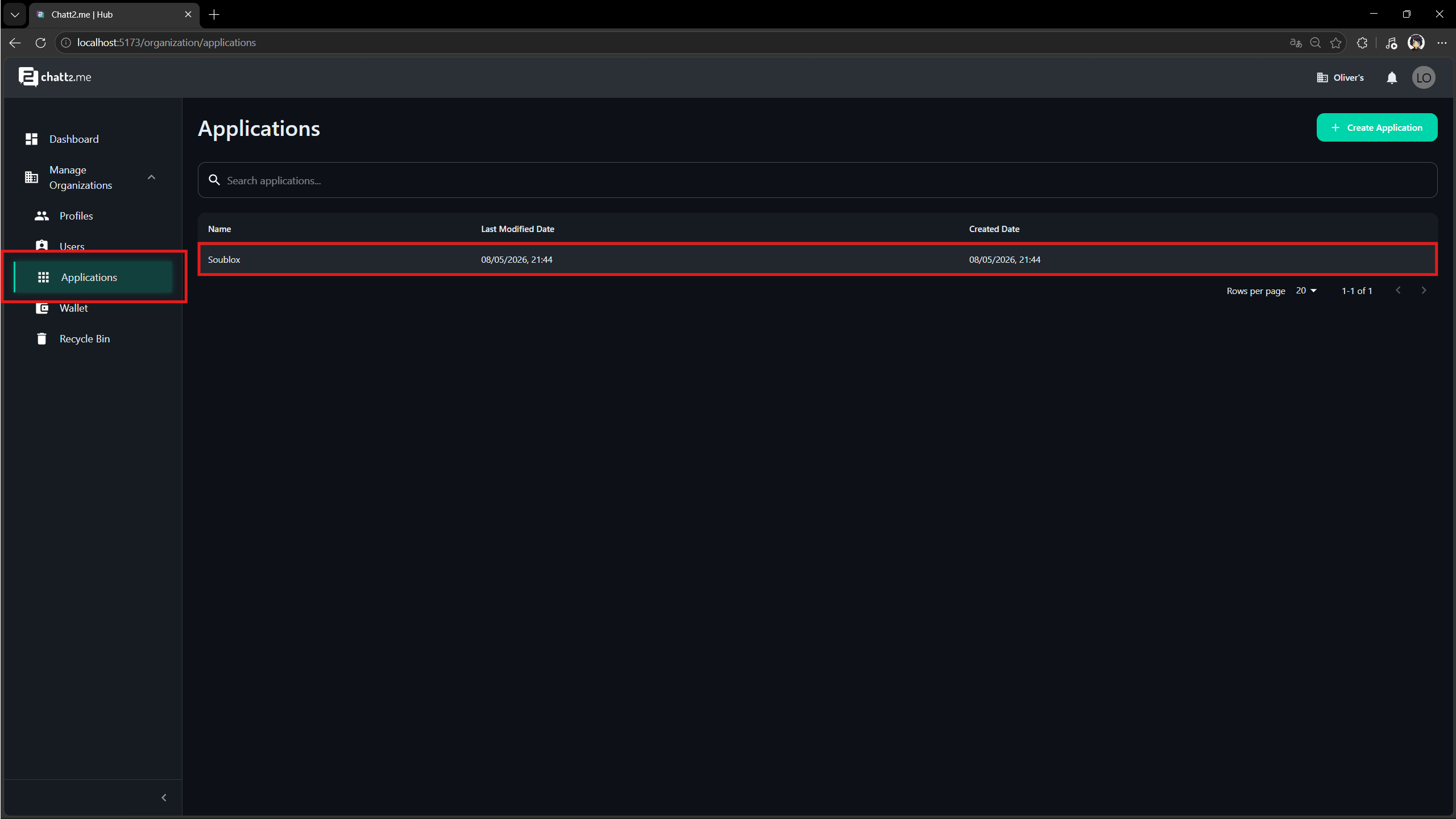
- Go to Settings → API Key
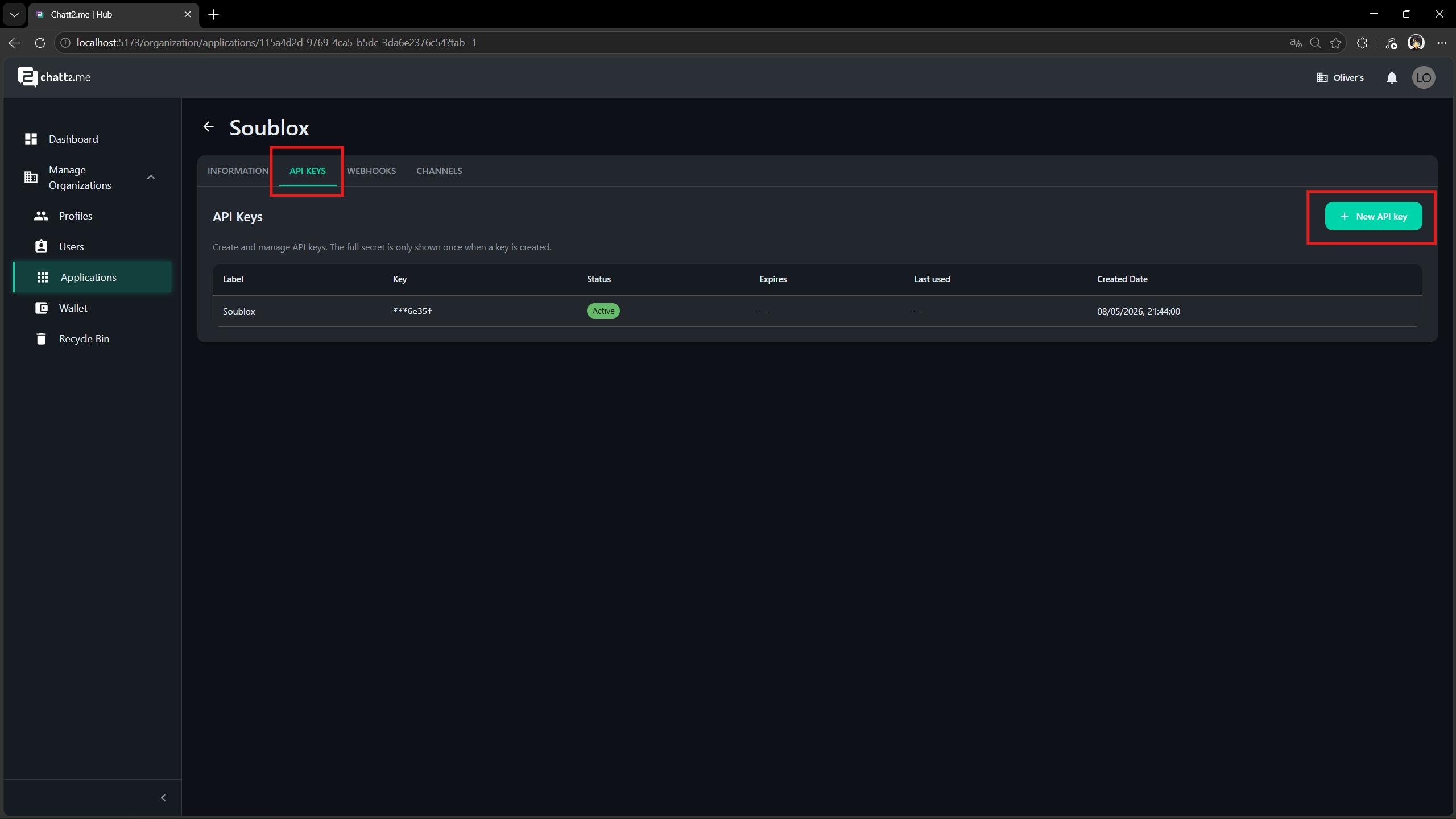
- Click Generate new key and copy the displayed value
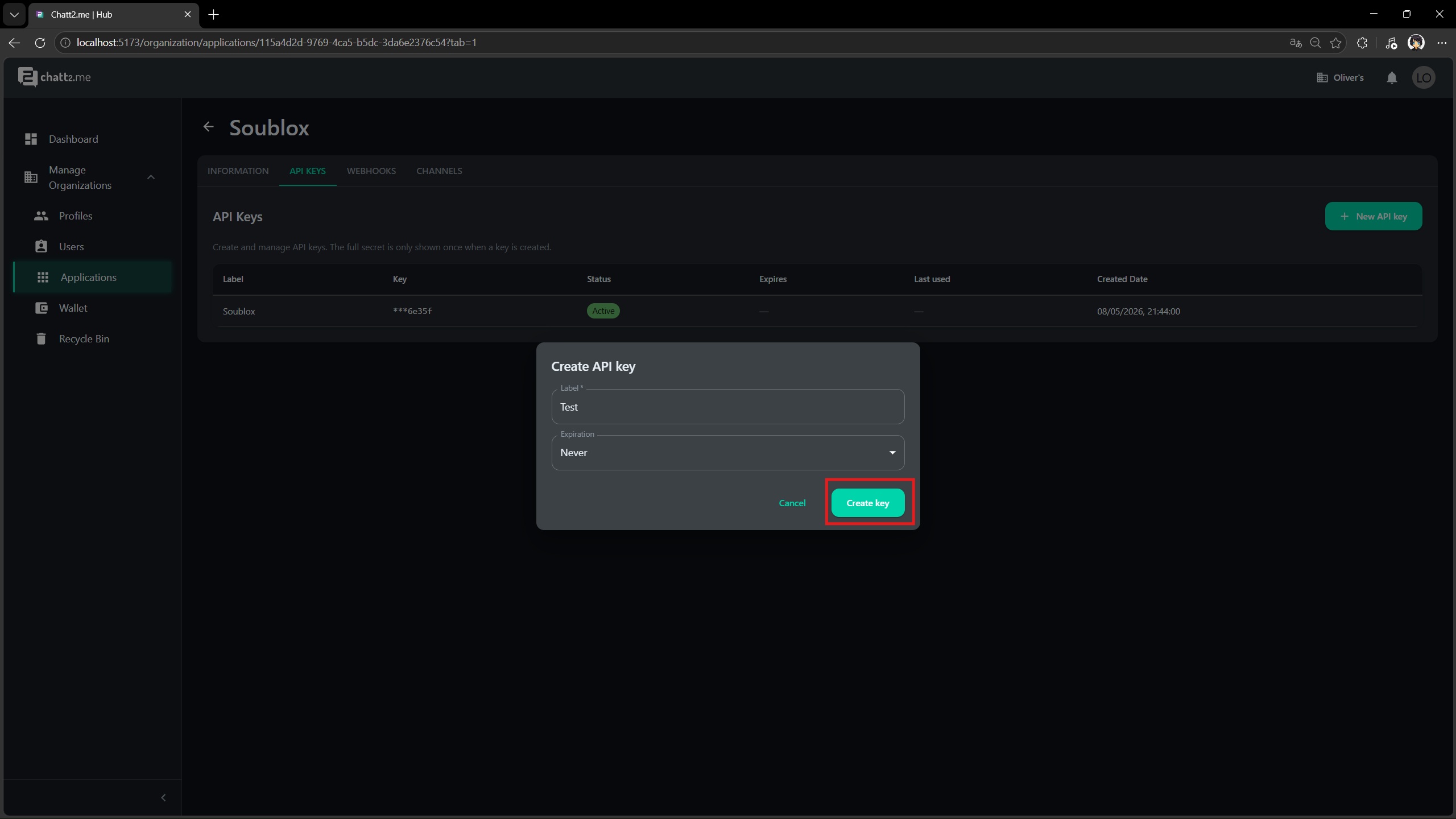
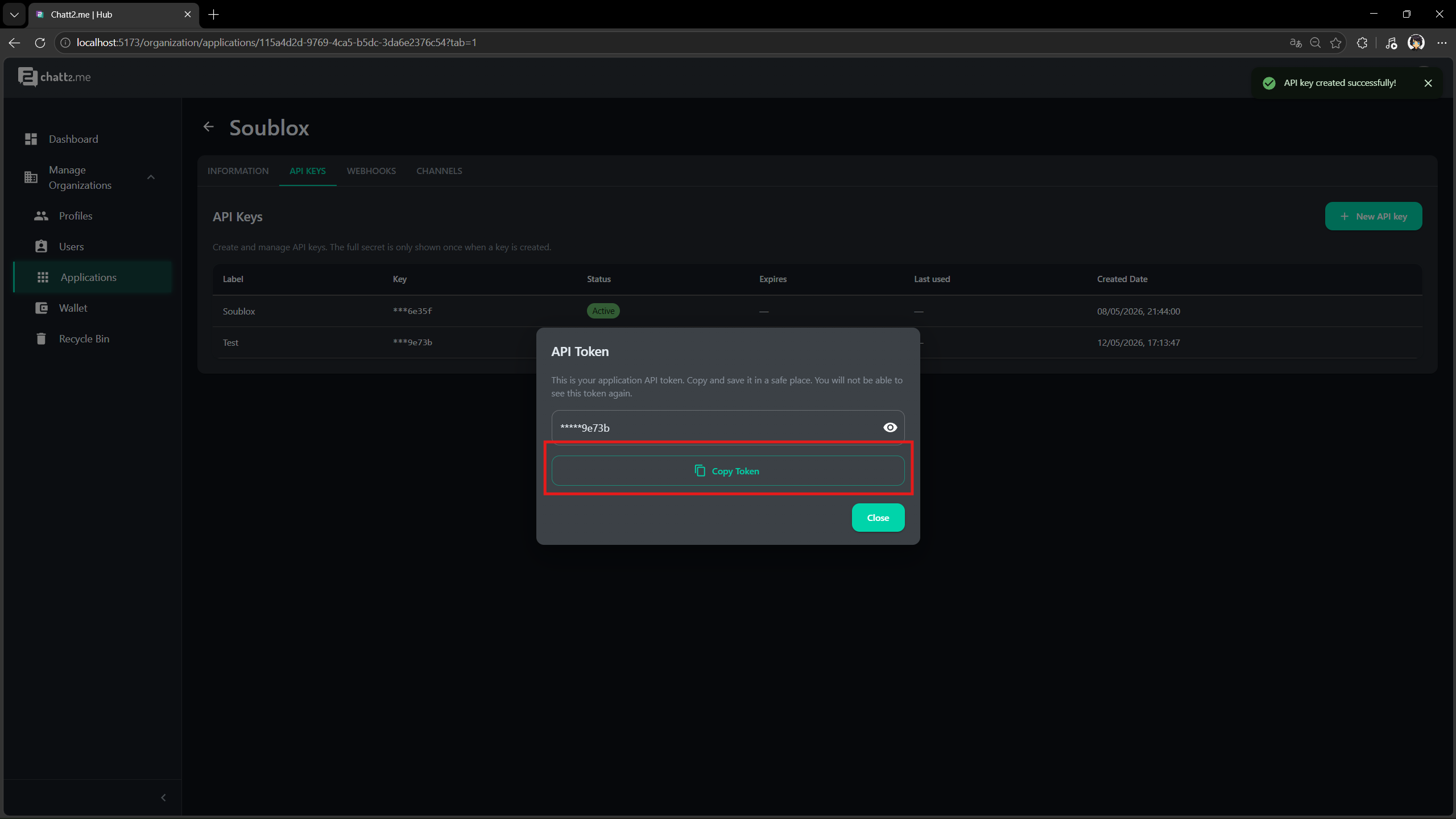
The key is displayed only once. If you lose access to it, you will need to generate a new one.
Use the generated key with an HTTP example from the chatt2.me Hub API Reference.
How to use
Send the key in the x-api-key header for authenticated operations:
POST /v1/communication/telegram/message
x-api-key: your-api-key-here
Content-Type: application/json
Examples by language
curl -X POST https://app.chatt2.me/v1/communication/telegram/message \
  -H "x-api-key: your-api-key-here" \
  -H "Content-Type: application/json" \
  -d '{"from": "channel-uuid", "to": "123456789", "content": {"text": "Hello!"}}'
const response = await fetch('https://app.chatt2.me/v1/communication/telegram/message', {
  method: 'POST',
  headers: {
    'x-api-key': process.env.CHATT2ME_API_KEY,
    'Content-Type': 'application/json',
  },
  body: JSON.stringify({
    from: 'channel-uuid',
    to: '123456789',
    content: { text: 'Hello!' },
  }),
});
import requests
import os

response = requests.post(
    'https://app.chatt2.me/v1/communication/telegram/message',
    headers={
        'x-api-key': os.environ['CHATT2ME_API_KEY'],
        'Content-Type': 'application/json',
    },
    json={
        'from': 'channel-uuid',
        'to': '123456789',
        'content': {'text': 'Hello!'},
    },
)
WhatsApp provider authentication
Keep using your Application API key in x-api-key for the Hub HTTP API.
The Hub manages the separate authentication used to connect your WhatsApp
channel to its provider. On connections migrated to Gupshup Universal Tokens,
the partner credential (UT) and the app-scoped credential (UAT) are managed by
the Hub, including renewal. Your integration does not generate, store or send
these provider tokens.
Provider token migration or renewal does not require replacing your Hub API key, changing channel identifiers or message payloads, or recreating webhook bindings. Continue using the connected number and the documented API calls. See WhatsApp connection and renewal.
A rejected Hub API key and a failed provider submission are different outcomes.
For example, a WhatsApp send can return HTTP 200 with status: error after the
Hub accepted authentication but the provider rejected submission. Replacing
an otherwise valid Hub API key does not repair the provider connection; follow
WhatsApp provider troubleshooting.
Authentication errors
| Scenario | Status | Recovery |
|---|---|---|
| Key missing, malformed, incorrect or revoked | 401 | Send x-api-key correctly; remove accidental spaces; obtain a valid key in the dashboard |
| Key expired | 401 | Generate a replacement key and update your server's secret |
| Application unavailable or access unavailable | 401 | Check the application's availability in the dashboard and contact support if access cannot be restored |
| Valid key, resource in another Application | 404 | Use the key for the application's channel/webhook/session |
| Resource ID does not exist in this Application | 404 | Check its UUID and application scope |
A valid key for another application is a resource-scope 404, not an invalid-key 401. HTTP errors use statusCode, code, message, hint and optional errors / operation-specific details; see the common error format. Receiver authentication protocols and webhook signatures authenticate Hub's outbound requests to your receiver, separately from this API key; see webhook creation.
Security best practices
- Never expose the API Key on the frontend (HTML, client-side JavaScript, unobfuscated mobile apps).
- Use environment variables to store the key (
CHATT2ME_API_KEY=...). - Do not commit the key to git — add
.envto.gitignore. - Rotate the key periodically in production environments.
- If the key is compromised, generate a new one immediately in the Hub Chatt2.me dashboard; revoke the compromised key in the dashboard.
Configuration validation errors
When a workspace tool configuration is rejected, HTTP 400 returns a stable
AGENT_TOOL_CONFIG_VALIDATION code and errors with the exact invalid field
paths. Each item has field, code and optional details.min, details.max
or details.relatedFields. Paths are relative to the configuration submitted.
Use the bounds returned by the server when presenting a correction; rejected
values are not included.
{
  "statusCode": 400,
  "code": "AGENT_TOOL_CONFIG_VALIDATION",
  "message": "AGENT_TOOL_CONFIG_VALIDATION",
  "hint": "Review the request fields and retry.",
  "errors": [
    { "field": "queues.0.name", "code": "FIELD_TOO_LONG", "details": { "max": 100 } }
  ]
}
Public Calendar and private dashboard controls
Only the six operations tagged Public Calendar allow anonymous access:
reading a published page or service, checking availability, creating a booking
and reading its avatar or cover image. They declare security: [] in OpenAPI. Unpublished or
unavailable pages and services return 404. No API key belongs in a public
booking page or its browser requests. Booking details are visitor-provided and
do not verify the visitor's identity.
Listing, reading, approving, updating or canceling existing appointments requires an application API key and is limited to that application. Public booking does not grant access to another reservation.
Dashboard search, publishing calendar pages, Google OAuth, credentials and
Google Calendar tool configuration are private dashboard operations. They are
not part of this customer API and cannot be authorized with an application API
key. Workspace tool access through an API key is limited to business_hours
and queue_routing. TikTok is coming soon.
Assistant onboarding
Hub MCP actions explains browser OAuth, team contexts and human approval. Application API keys authenticate HTTP API calls; they do not authenticate the MCP connection. Additional API key issuance requires MFA in the Hub.